

Takaro module library

Takaro Modules

Takaro is a game server management platform for running, automating, and moderating multiplayer communities. These modules install into Takaro to add server automation, Discord workflows, economy systems, and moderation tools.

NameColorAndGradient

by Millie
for 7 Days to Die

Name Color and Gradient

Lets players style their in-game name with a solid hex color or a two-color gradient.
Commands:
  • /setcolor <hex> applies one solid color, for example /setcolor C827F5.
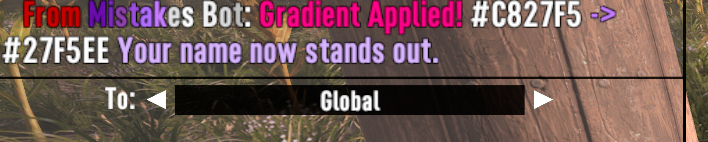
  • /setgradient <hex1> <hex2> applies a gradient, for example /setgradient C827F5 27F5EE.
Choices are saved per player and reapplied when the player reconnects.

Compatibility note

This module sends the ocn console command and uses 7 Days to Die color tags. It only works on servers where that command/mod support is available. If the game server rejects ocn, the connector misses the reconnect event, or the server strips rich text in a specific context, the color may not apply every time and the player may need to run the command again.

Screenshots

Colored player name in chat
Gradient applied confirmation
Set gradient command example
communityTakaro 0.7.4

Components Overview

1
config
2
commands
1
hooks
0
Cron Jobs
0
functions
0
permissions

Hook Update: loadSavedNameColor

August 30, 2026
Updated 1 hook implementation.

New Module: NameColorAndGradient

NEW
August 30, 2026
Updated to version latest. Added 2 commands: setColor, setGradient. Added 1 hook: loadSavedNameColor (player-connected).

Configuration

Configure this module using the schemas below. The JSON schema defines the data structure, while the UI schema customizes how the configuration form is displayed.

Configuration Schema

No configuration properties defined. This module uses default settings.

UI Schema

No UI schema defined. Configuration form will use default rendering.

About Configuration Schemas

The Configuration Schema defines the structure and validation rules for module settings. The UI Schema customizes how the configuration form is displayed in the Takaro interface, including field ordering, labels, and input types.

Commands (2)

These commands can be executed by players in-game. Each command has a trigger word, optional arguments, and executes JavaScript code on the server.

setColor

/setcolorTrigger Command

Description

Usage: /setcolor . Example: /setcolor C827F5. Requires a 7D2D server/mod that supports the ocn console command.

Arguments (1)

color
stringPosition 0
Help: Six-digit hex color, with or without #. Example: C827F5
Default: ""

Function Implementation

setColor Function

JAVASCRIPT

Usage Example

Player types: /setcolor <color>

setGradient

/setgradientTrigger Command

Description

Usage: /setgradient . Example: /setgradient C827F5 27F5EE. Requires a 7D2D server/mod that supports the ocn console command.

Arguments (2)

color1
stringPosition 0
Help: Starting six-digit hex color, with or without #.
Default: ""
color2
stringPosition 1
Help: Ending six-digit hex color, with or without #.
Default: ""

Function Implementation

setGradient Function

JAVASCRIPT

Usage Example

Player types: /setgradient <color1> <color2>

About Module Commands

Commands allow players to interact with your module through chat. Each command has a trigger word that players type (prefixed with /), optional arguments for parameters, and a JavaScript function that executes when the command is used. Arguments are automatically validated and passed to the function.

Hooks (1)

These hooks respond to various game events automatically. Each hook executes JavaScript code when its specific event type occurs, allowing modules to react to player actions, system changes, and more.

Real-time Events

1 hook

loadSavedNameColor

player-connectedEvent Type
Description
Reapplies a saved solid color or gradient when the player connects.
Function Implementation

loadSavedNameColor Hook Function

JAVASCRIPT
Event Details
Event Type:player-connected
Trigger:Automatic
Category:Real-time Events

About Module Hooks

Hooks allow your module to respond automatically to game events like player actions, server status changes, and chat messages. Each hook has an event type that determines when it triggers, optional regex patterns for filtering specific events, and a JavaScript function that executes when the conditions are met. Hooks are grouped by category for better organization.