
Takaro module library

Takaro Modules

Takaro is a game server management platform for running, automating, and moderating multiplayer communities. These modules install into Takaro to add server automation, Discord workflows, economy systems, and moderation tools.

SVMActivityTracker

by SVMOTNIK
for 7 Days to Die
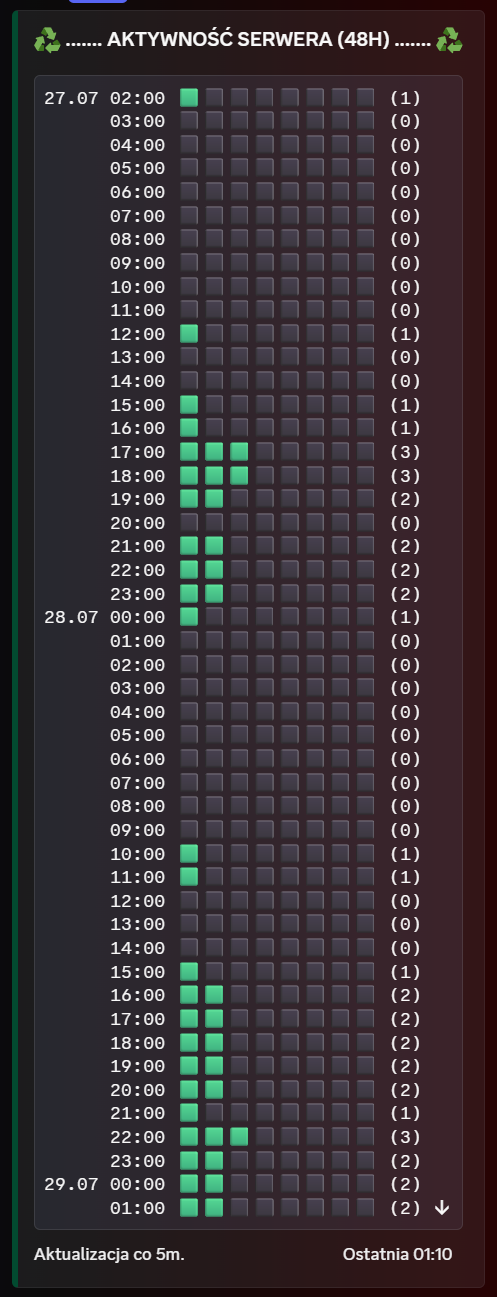
This Takaro module acts as an automated 48-hour player activity tracking and chart-generation system for 7 Days to Die servers, posting a rolling visual graph directly to a Discord channel.
Use this module to:
  • Query online players through the game server command interface.
  • Track hourly peak player counts over a rolling 48-hour window.
  • Post a clean text-based Discord chart using emoji blocks.
  • Store history and the Discord message ID in Takaro variables so the same message is updated over time.
Good fit for 7 Days to Die servers that want a lightweight public activity graph without external dashboards.
Old name: Wykres Aktywnosci.

Screenshot

SVM Activity Tracker 48-hour server activity chart
communityTakaro 0.7.3

Components Overview

1
config
0
commands
0
hooks
1
Cron Jobs
0
functions
0
permissions

Configuration

Configure this module using the schemas below. The JSON schema defines the data structure, while the UI schema customizes how the configuration form is displayed.

Configuration Schema

Configuration Properties (1)

discordChannelId*string
Discord Channel ID

The Discord channel ID where the activity chart will be posted.

Constraints: minLength: 17, maxLength: 20

UI Schema

No configuration properties defined. This module uses default settings.

About Configuration Schemas

The Configuration Schema defines the structure and validation rules for module settings. The UI Schema customizes how the configuration form is displayed in the Takaro interface, including field ordering, labels, and input types.

Scheduled Jobs (1)

These jobs run automatically on a schedule defined by cron expressions. Each job executes JavaScript code at specific times or intervals.

updateActivityChart

*/5 * * * *Schedule

Description

Updates the 48-hour Discord activity chart.

Schedule Details

Cron Expression
*/5 * * * *
Human-Readable Schedule

Every 5 minutes

Function Implementation

updateActivityChart Function

JAVASCRIPT

Cron Expression Format

minute hour day-of-month month day-of-week

Each field can contain numbers, ranges (1-5), lists (1,3,5), or wildcards (*). Use */n for intervals (e.g., */5 for every 5 units).

About Scheduled Jobs

Cron jobs allow your module to execute code automatically on a schedule. Each job has a cron expression that defines when it runs, and a JavaScript function that executes at those times. Jobs run server-side and can perform maintenance tasks, send notifications, or update game state automatically.