serverstats
/serverstatsTrigger Command
Description
Shows online player count, current day, time, and blood moon indicator.
Function Implementation
serverstats Function
JAVASCRIPTUsage Example
Player types: /serverstats
/fund <amount> to contribute their own currency toward the active goal./fundstatus shows the current total, target, progress percentage, and round count./fundhistory shows total completions and the last player who pushed the fund over the line.koji-paper-1. For this capture the game-server command prefix was temporarily set to ! so Mineflayer sends normal chat messages instead of Minecraft slash commands. On a normal server the same module commands use whatever command prefix the server has configured.Bot1_fund90dj runs !fundstatus and sees 0/50.Bot1_fund90dj contributes 20 currency with !fund 20.Bot1_pool90dj runs !fundstatus and sees 20/50 (40%).Bot1_pool90dj contributes 35 currency with !fund 35.50 threshold, broadcasts the unlock message, executes the configured completion command, and starts round #1.!fundhistory confirms 1 completion total and records Bot1_pool90dj as the player who completed the round.
| Command | Purpose |
|---|---|
/fund <amount> | Contribute currency to the active community fund. |
/fundstatus | Show current total, target, progress, and round count. |
/fundhistory | Show completion count and the last completed round. |
| Permission | Purpose |
|---|---|
COMMUNITY_FUND_CONTRIBUTE | Allows a player to contribute currency with /fund <amount>. |
COMMUNITY_FUND_VIEW_HISTORY | Allows a player to view /fundhistory. |
/fundstatus is intentionally public and does not require a permission.fundThreshold: target amount that completes a round.minimumContribution: minimum currency amount a player can contribute per command.completionMessage: broadcast message sent when the threshold is reached. Supports {threshold}.completionCommands: raw game-server commands executed after completion, for rewards or server events.broadcastContributions: whether each contribution is announced globally.koji-paper-1) with real Mineflayer players and live Takaro chat events. The run imported and installed the module, assigned the contribution/history permissions, granted test currency, sent the commands through real bot chat, and verified persisted variables after completion.fundThreshold: 50minimumContribution: 5completionMessage: Community Fund reached {threshold}! Server-wide bonus unlocked!completionCommands: say Community Fund complete: reward unlockedbroadcastContributions: true20 currency from Bot1_fund90dj35 currency from Bot1_pool90dj5051#1, 2026-04-27, by Bot1_pool90dj


cronJobGenerator. You configure the jobs you want in the module settings, then the generator creates the real scheduled Takaro cronjobs for the current game server. When you change the config later, the generator updates matching jobs and removes generated jobs that are no longer configured for that server.daily rewards, restart warning, or nightly cleanup.*/10 * * * * for every ten minutes or 15 2 * * * for 02:15 every day.daily rewards with say first reminder; say second reminder creates two generated cronjobs on the same schedule. A row named nightly cleanup with save-all can run once per night.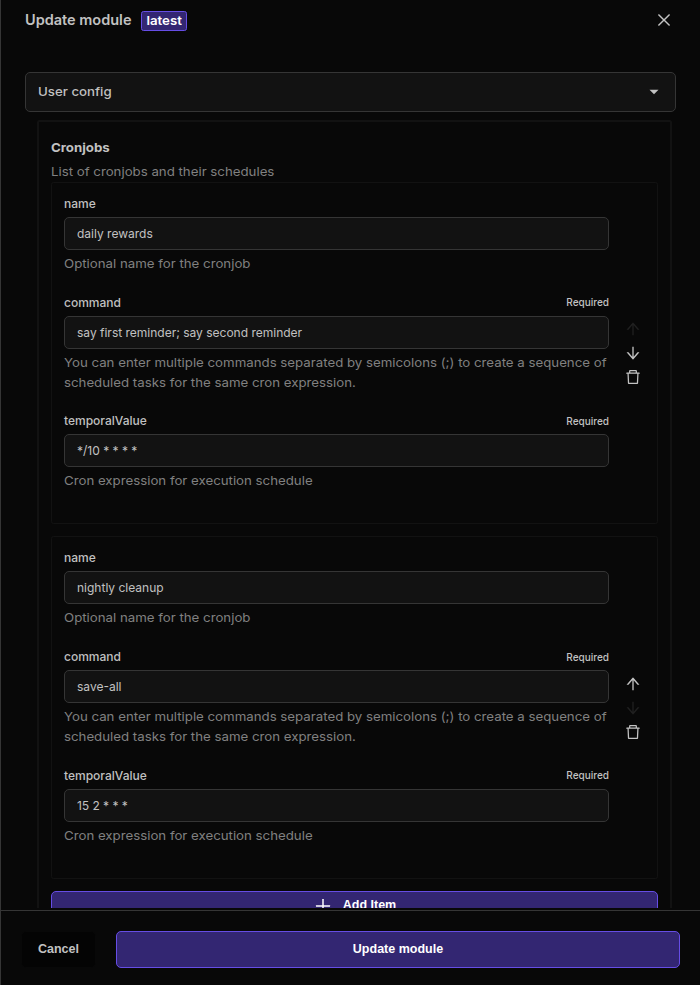
seq1 and seq2 to the generated names.cronJobGenerator run again. It reconciles the generated jobs to match the current config: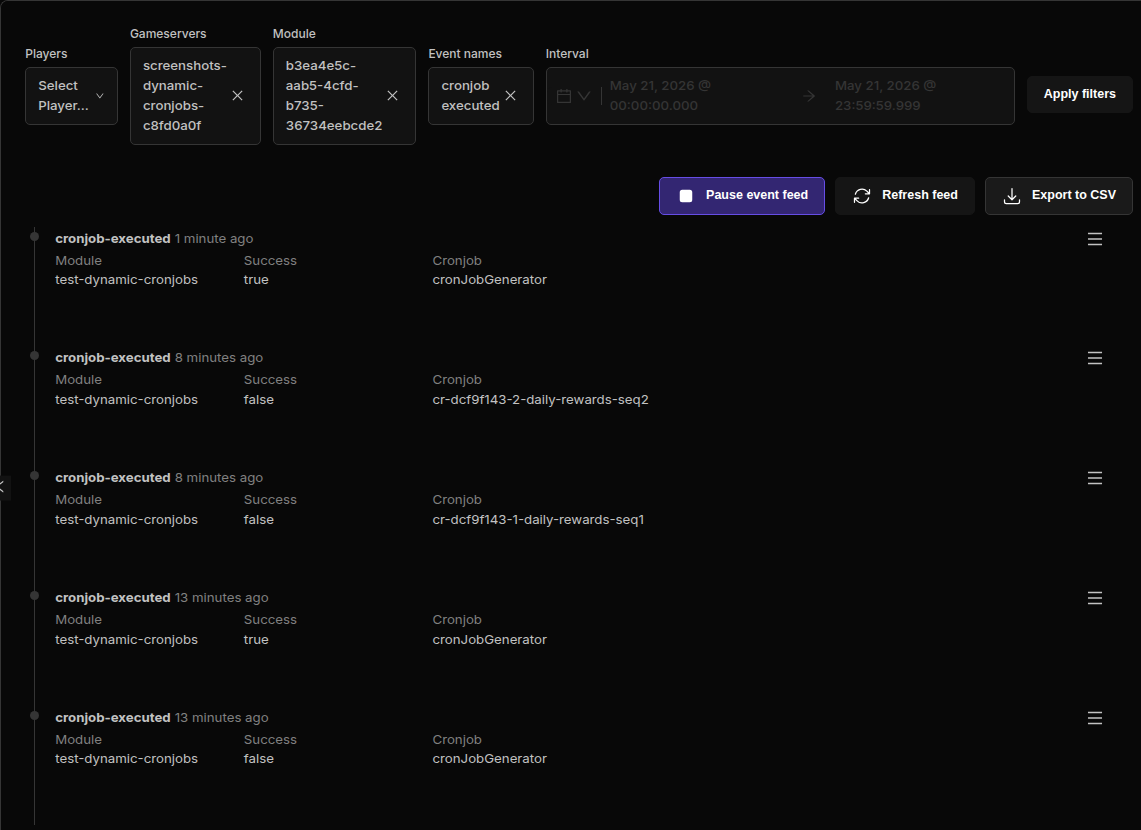
/refcode to generate or view a shareable code./referral <code> during the configured referral window./refstats and /reftop make the program visible to players.koji-paper-1. For this sandbox capture the game-server command prefix was temporarily set to ! so Mineflayer sends normal chat messages instead of Minecraft slash commands. On a normal server the same module commands use whatever command prefix the server has configured.Bot1_rafo2g0 runs !refcode and receives referral code N4A46Q.Bot1_rabo2g0 runs !referral N4A46Q.17 currency welcome bonus.123 currency.!refstats shows the referrer has 1 paid referral and 123 currency earned.!refstats for the referee shows they were referred by Bot1_rafo2g0.!reftop shows the referrer at the top of the leaderboard.
| Command | Purpose |
|---|---|
/refcode | Generate or display the player's referral code. |
/referral <code> | Claim a referral code from the player who invited them. |
/refstats | Show personal referral stats, rewards, and referral status. |
/reftop | Show the top referrers by paid referral count. |
| Command | Purpose |
|---|---|
/reflink <referee> <referrer> | Force-create a paid referral link and pay rewards. |
/refunlink <referee> | Remove a referral link and roll back tracked stats where possible. |


prizeIsCurrency: pay referrers currency when enabled; use item rewards when disabled.referrerCurrencyReward: currency paid to the referrer after the referee qualifies.refereeCurrencyReward: immediate welcome currency bonus paid to the referred player.items: item prize pool used when prizeIsCurrency is false.playtimeThresholdMinutes: minutes the referee must play before the referrer is paid.referralWindowHours: how long after first connect a player can still claim a referral code.maxReferralsPerDay: daily cap for successful referrals a player can earn.maxReferralsLifetime: lifetime cap for paid referrals a player can earn.enabled, cronjobs (reset-daily-counters, sweep-pending-referrals), hook (on-player-disconnect), and commands (referral, reftop, refstats, refunlink, refcode, reflink).koji-paper-1). The run imported and installed the module, assigned REFERRAL_USE, generated a referral code from live bot chat, claimed it from a second player through live bot chat, ran the payout sweep, and verified /refstats + /reftop in the dashboard chat.N4A46Qpaid17 currency123 currencyreferralsTotal: 1referralsPaid: 1referralsRejected: 0currencyEarned: 123


8ball) to ask the Magic 8-Ball a question.sendMessage: Choose whether the 8-Ball's response is sent as a serverMessage (to all players) or a playerPM (private message to the player who used the command).responses: Edit the array of strings to customize the 8-Ball's possible answers. Ensure there is at least one response.MAGIC_8BALL_USE permission to the player groups or individuals who should be able to use the 8ball command./8ball command (or the configured trigger) followed by their question. The 8-Ball's response will be displayed according to the sendMessage configuration.responses configuration to avoid errors.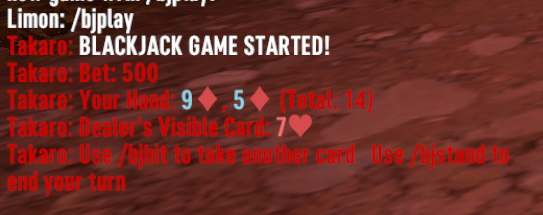
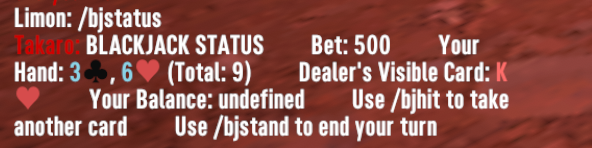
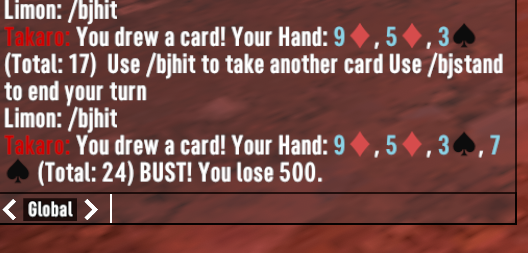
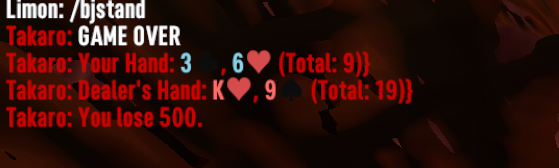
/bjhit commandmaxWrongGuesses: Set the number of incorrect guesses allowed before the game ends.minWordLength and maxWordLength: Define valid word length parameters.entryFee: Cost for players to join a game.hostingFee: Cost to start a new game.guessPrice: Optional cost per letter guess.winReward: Currency awarded to successful players.hostReward: Currency awarded to hosts when no player solves the puzzle.gameTimeout: Maximum duration a game can run./hangmanstart [word]: Create a new game or start a waiting game./hangmanjoin: Join an existing game that hasn't started./hangmanguess [letter/word]: Make a guess during an active game./hangmanstatus: Check the current state of the game./hangmanreveal: Reveal the answer and end the game (host/admin only)./hangmancancel: Cancel the current game (host/admin only).HANGMAN_HOST: Allows players to create and host games.HANGMAN_PLAY: Allows players to join games and make guesses.HANGMAN_ADMIN: Grants administrative control over all games./roulette red 100 - Bet 100 on any red number/roulette black 200 - Bet 200 on any black number/roulette even 150 - Bet 150 on even numbers/roulette odd 150 - Bet 150 on odd numbers/roulette high 100 - Bet 100 on high numbers (19-36)/roulette low 100 - Bet 100 on low numbers (1-18)/roulette 17 200 - Bet 200 specifically on number 17/roulette red17 300 - Bet 300 specifically on red 17 (higher payout)/roulettestats - View your personal roulette statistics/rouletterules - Display roulette rules and payouts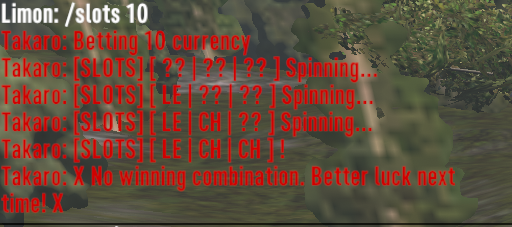
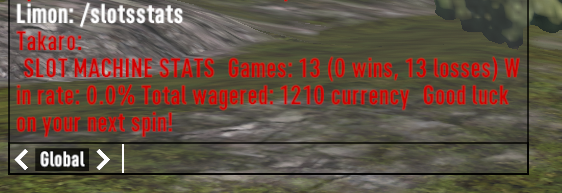
/slots [amount] - Place a bet and spin the slot machine/slotsstats - View your personal gambling statistics/slotsrules - Check payouts, rules and betting information/slotsreset [player] - Admin command to reset player statistics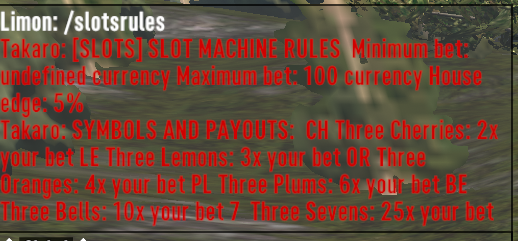
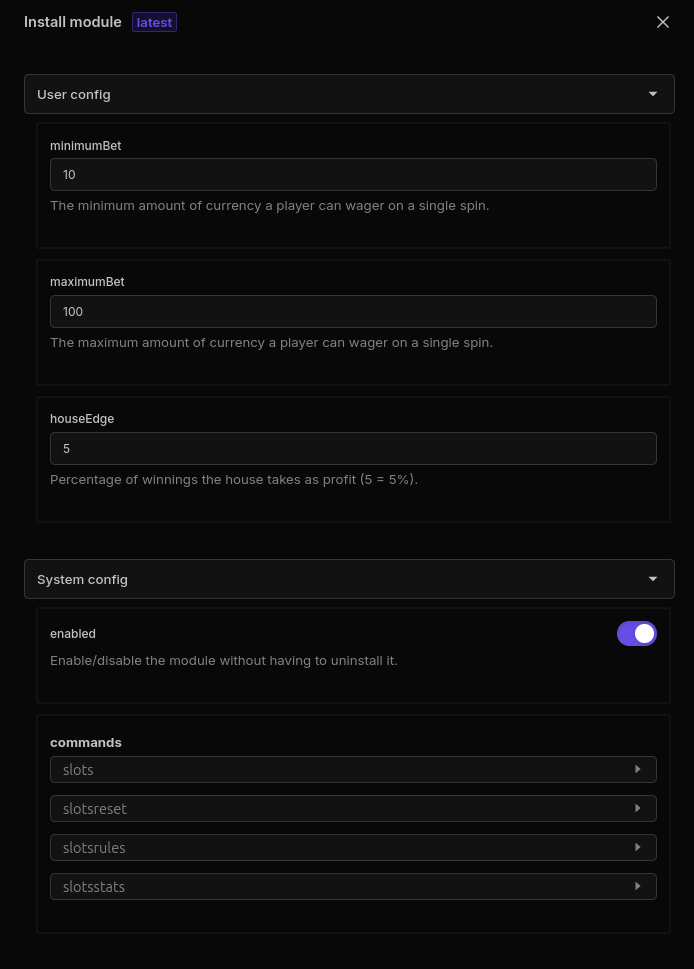
minimumBet: Lowest possible wager amountmaximumBet: Highest possible wager amounthouseEdge: Percentage profit margin for the serverSLOTS_PLAY: Basic permission to use the slot machineSLOTS_HIGHER_LIMITS: VIP permission allowing higher maximum betsSLOTS_ADMIN: Administrative access to reset stats and manage the modulehttps://your-takaro.com/settings/roles/743b9623-ad09-4cf2-86c0-3d7faed57a88/roles/)743b9623-ad09-4cf2-86c0-3d7faed57a88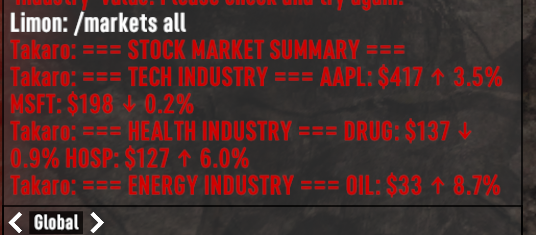

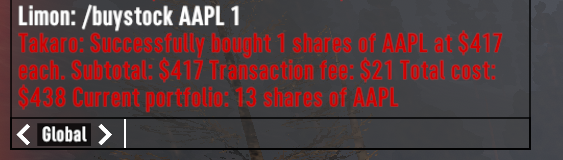
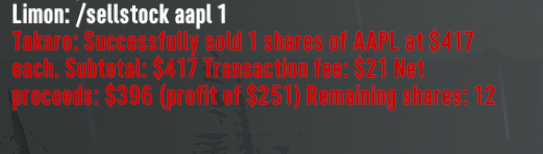
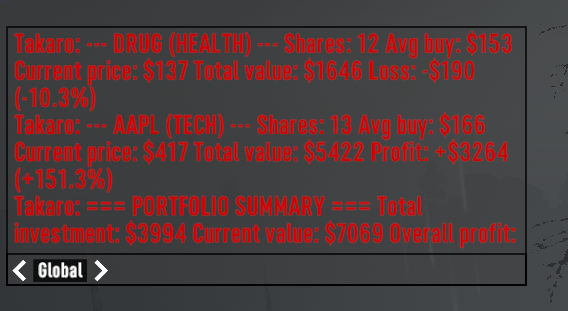

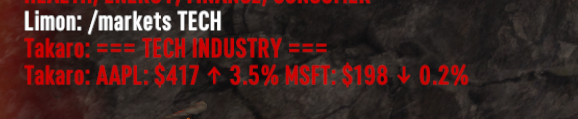
/markets [industry] - View all stocks or filter by industry/stockinfo [ticker] - Get detailed information about a specific stock/buystock <ticker> <amount> - Purchase shares of a stock/sellstock <ticker> <amount> - Sell shares from your portfolio/stockportfolio - View your current holdings and performance/triggerevent [event] - Admin command to trigger specific market eventsbuffplayer PlayerName BuffName for online players. It also includes a permission-gated admin command, /grantbuff <player> <buffName>, so staff can manually test or grant a buff without waiting for the schedule.
grant-playtime-rewards cronjob finds online players and grants one random configured reward to each player.buffCommandTemplate defaults to buffplayer {playerName} {buffName}, with placeholders for {playerName}, {playerId}, {gameId}, and {buffName}./grantbuff <player> <buffName> is guarded by PLAYTIME_BUFF_ADMIN for manual buff grants.{playerName}, {buffName}, {rewardName}, and {amount}.{ "buffCommandTemplate": "buffplayer {playerName} {buffName}", "buffRewards": [ { "buffName": "WellFed", "weight": 2, "enabled": true }, { "buffName": "MegaCrush", "weight": 1, "enabled": true } ], "commandRewards": [ { "name": "Ammo bundle", "command": "give {playerName} ammo762mmBulletBall 30", "weight": 1 } ], "currencyRewards": [ { "name": "Pocket money", "amount": 25, "weight": 1 } ] }
| Command | Purpose |
|---|---|
/grantbuff <player> <buffName> | Manually grant a buff to a player. Requires PLAYTIME_BUFF_ADMIN. |
| Permission | Purpose |
|---|---|
PLAYTIME_BUFF_ADMIN | Allows staff to use /grantbuff for manual grants and testing. |
buffCommandTemplate: Console command template for buff grants. Defaults to buffplayer {playerName} {buffName}.buffRewards: Weighted list of buff names eligible for the hourly reward cycle.commandRewards: Weighted list of generic console commands for item, ammo, food, or custom rewards.currencyRewards: Weighted list of Takaro currency grants.announceRewards: Toggle broadcast messages for reward grants.defaultRewardMessage: Fallback announcement when a reward does not define its own message.koji-paper-1 using a real Mineflayer player, Bot1_BuffTester.buffplayer command, the test used a Minecraft-safe template: say [PlaytimeBuff] {playerName} received {buffName}. The module still exercised the important Takaro path: online player lookup, player-name hydration, command template rendering, game-server command execution, announcement sending, and Takaro currency grants.grant-playtime-rewards found Bot1_BuffTester online.say [PlaytimeBuff] Bot1_BuffTester received WellFed with 200 OK from the game-server command API.Bot1_BuffTester got the WellFed buff reward.add-currency with 25 and emitted a currency-added event.success: true and granted 1 reward(s) to 1 online player(s).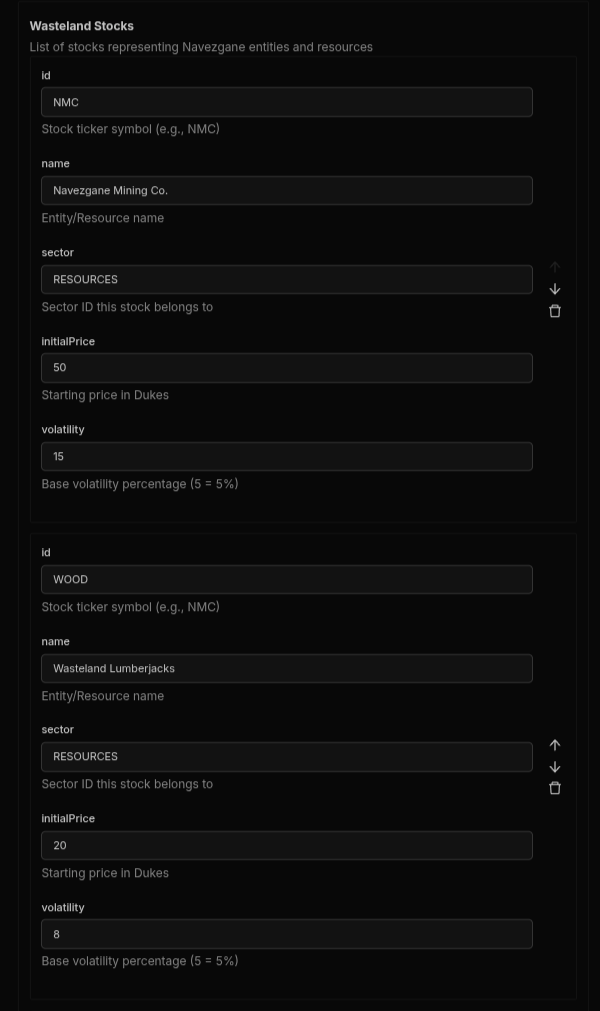
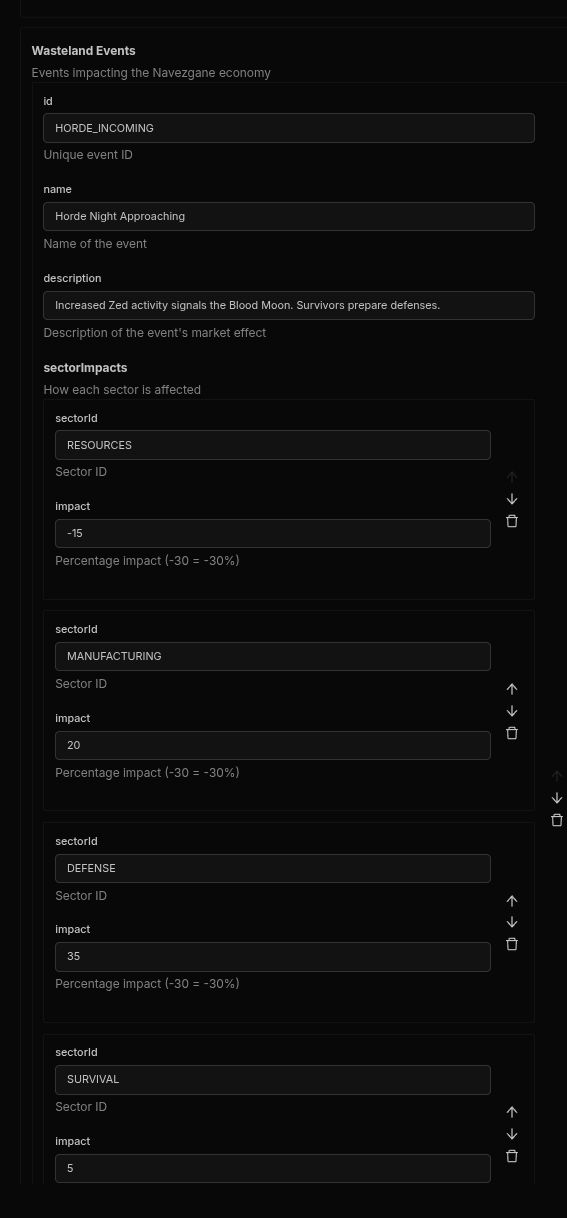

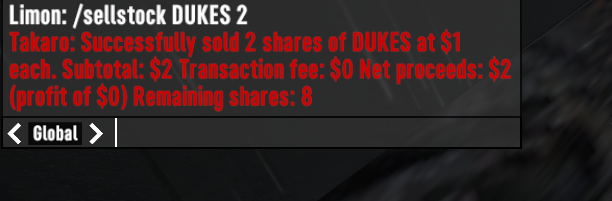
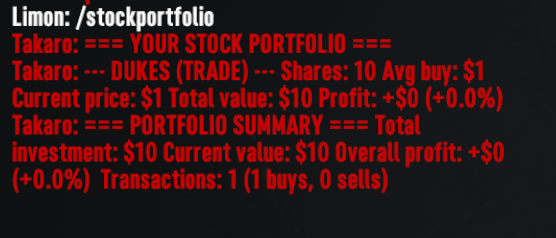
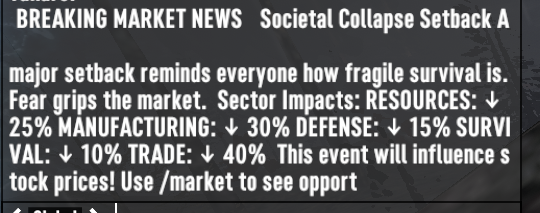

/markets [industry] - View all stocks or filter by industry/stockinfo [ticker] - Get detailed information about a specific stock/buystock <ticker> <amount> - Purchase shares of a stock/sellstock <ticker> <amount> - Sell shares from your portfolio/stockportfolio - View your current holdings and performance/triggerevent [event] - Admin command to trigger specific market events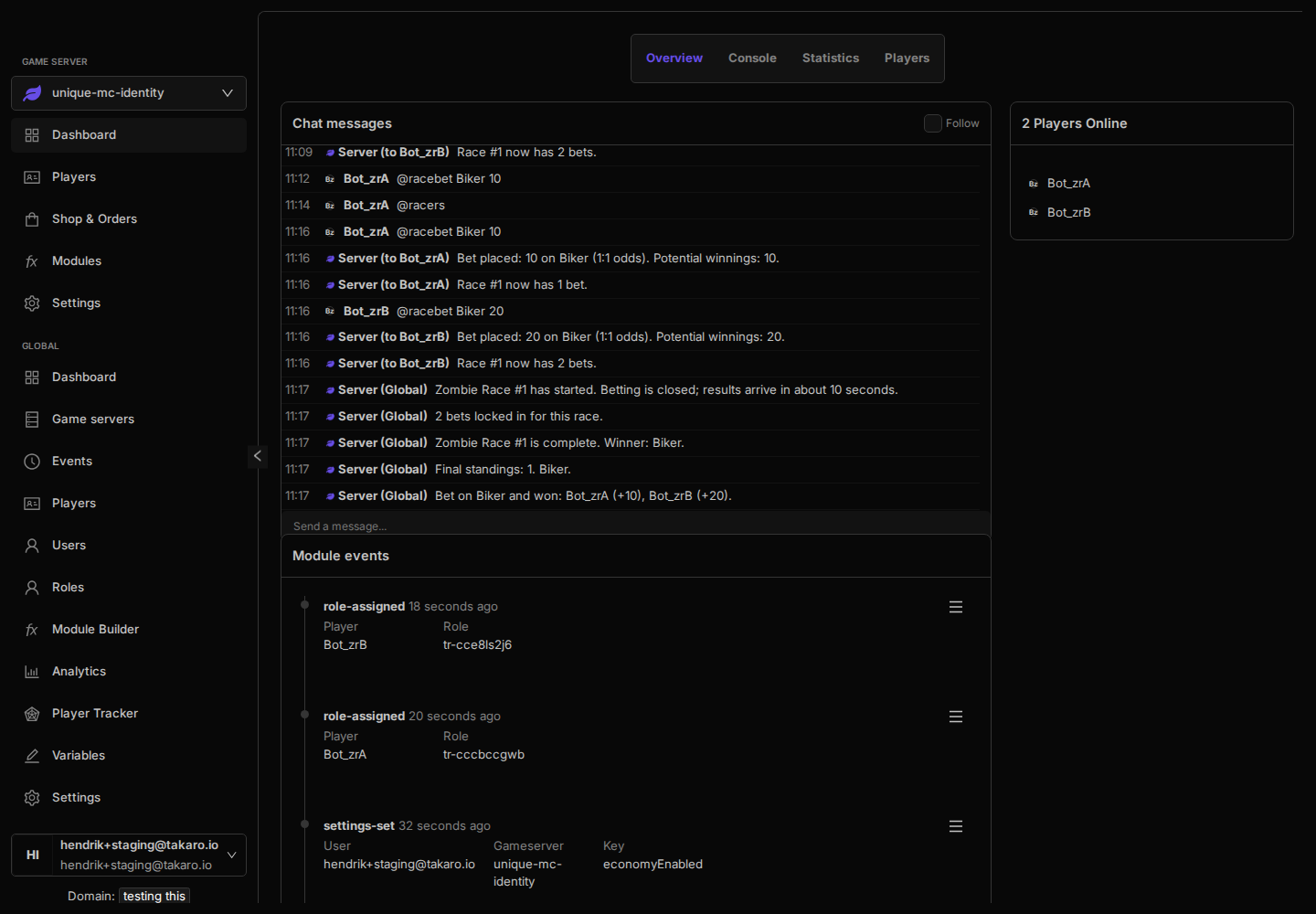
Name; Odds lines, for example Biker; 2, where the number controls the payout multiplier.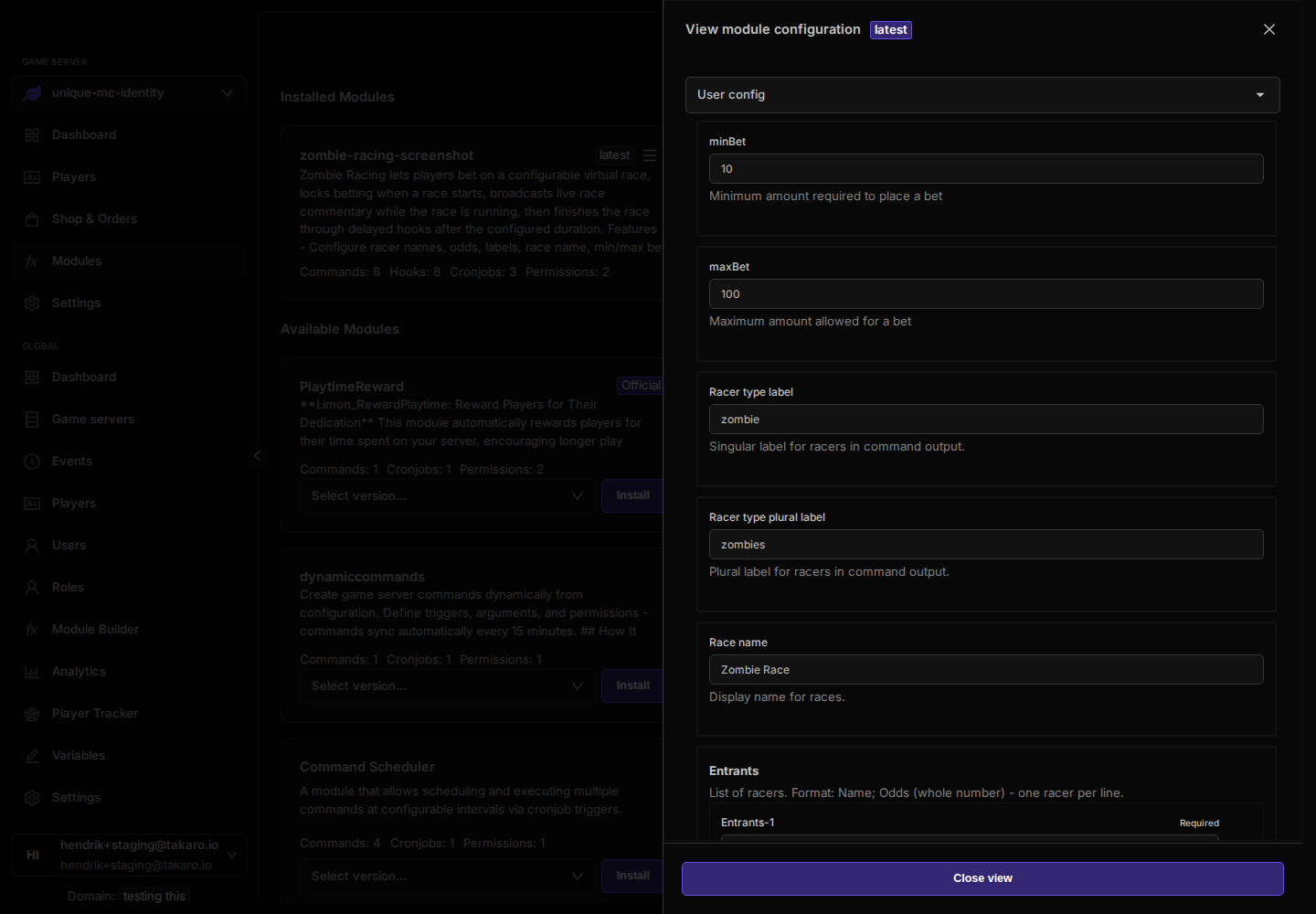
| Command | Permission | Purpose |
|---|---|---|
/racebet <racer> <amount> | RACING_BET | Place or replace a bet for the next race. |
/racers | RACING_BET | Show available racers, odds, next race timing, and bet limits. |
/myracebets | RACING_BET | Show your current or locked race bets. |
/nextrace | RACING_BET | Show upcoming race status and your active bets. |
/lastrace | RACING_BET | Show the latest race winner, standings, and your result. |
/racestats | RACING_BET | Show your personal betting statistics. |
/raceleaderboard | RACING_BET | Show the top racing bettors by net winnings. |
/startrace | RACING_ADMIN | Start a race manually. |
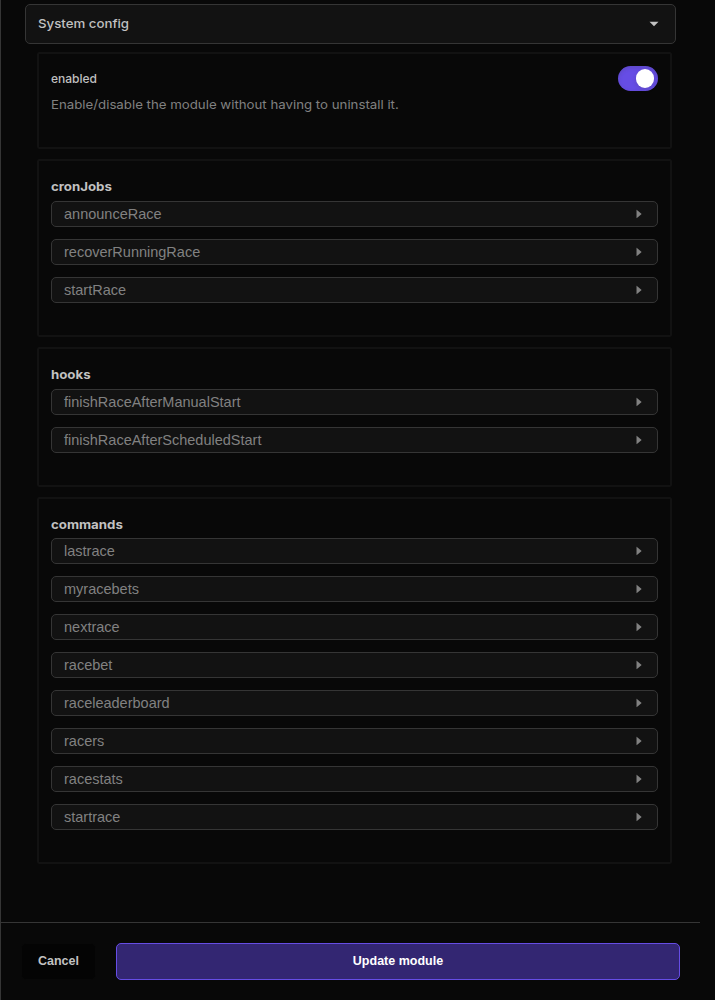
announceRace and startRace handle scheduled announcements and race starts. The finish hooks complete scheduled or manually started races after the configured delay, and commentary hooks send live race updates. recoverRunningRace can finish or clean up a race that was interrupted while running.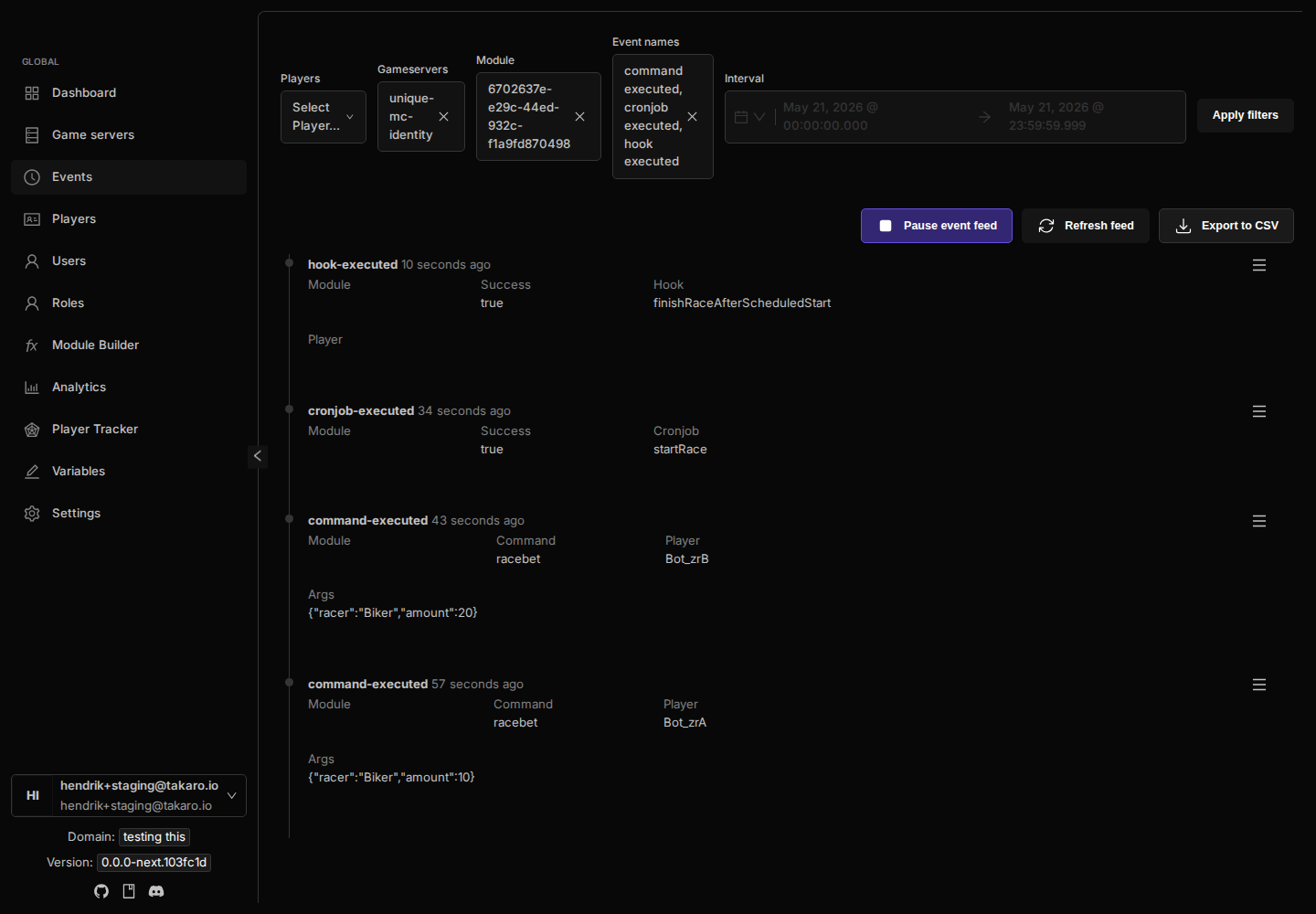
RACING_BET to players who can place race bets and RACING_ADMIN to staff who can start races manually./BBM command automatically sets the necessary server commands to activate 'Better Blood Moons'. It also provides a reminder about a recommended XML setting change./BBMoff command reverts the server settings to their default, effectively disabling 'Better Blood Moons'. It also provides a reminder about reverting the XML setting if changed.CPMsettings.xml file, reducing the risk of errors and making it easier to switch between default and enhanced Blood Moon settings./BBM and /BBMoff commands is controlled by a dedicated permission.BETTER_BLOOD_MOONS permission to the user roles or players who should be able to use the /BBM and /BBMoff commands./BBM: Executes the commands to enable 'Better Blood Moons' and displays a recommended XML setting./BBMoff: Executes the commands to disable 'Better Blood Moons' and displays a reminder about the XML setting.BloodmoonSpawner_DespawnAllOnStart) in the CPMsettings.xml file. While the module automates other settings, this XML setting might need manual adjustment for optimal behavior.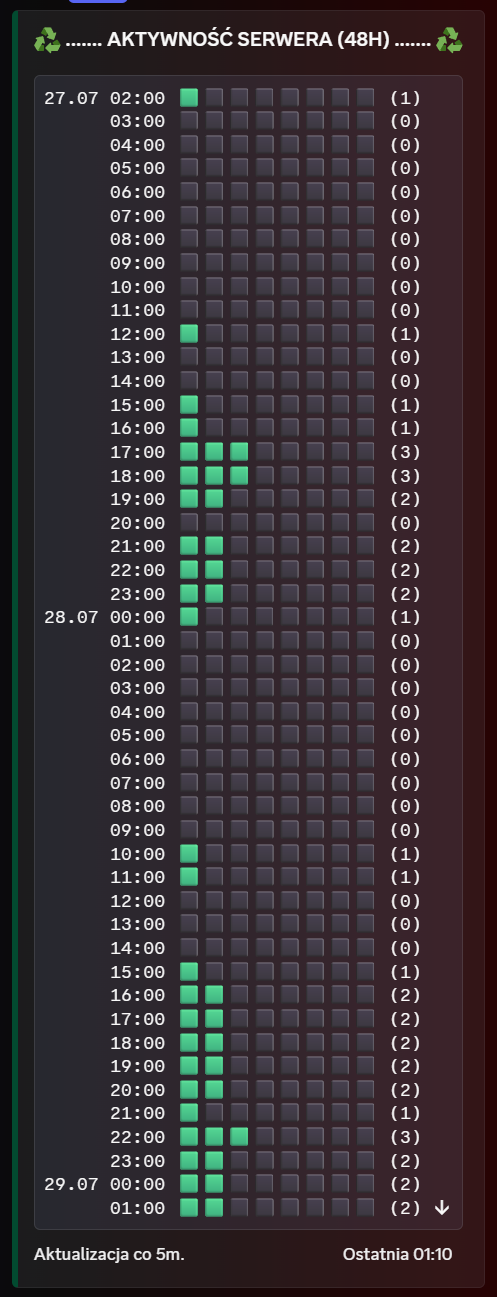
Takaro module library
Takaro is a game server management platform for running, automating, and moderating multiplayer communities. These modules install into Takaro to add server automation, Discord workflows, economy systems, and moderation tools.
monitorDeathLog (log). Updated 1 hook implementation.serverstats. Added 6 hooks: discordChatRelay (discord-message), gameChatRelay (chat-message), monitorLeave (player-disconnected), monitorJoin (player-connected), monitorServerStatus (server-status-changed), monitorDeath (player-death). Added 2 scheduled tasks: bloodMoonMonitor, updateStatus. Added 1 function: discord-7d2d-status-helpers. New configuration options: language, discordChannelId, chatRelayDiscordChannelId, bloodMoonDiscordChannelId, relayDiscordToGame, relayGameToDiscord, playerChatEmoji, monitorJoins, monitorLeaves, monitorDeaths, privateBloodMoonNoticeOnFirstJoin, timeConsoleCommand, firstHordeDay, hordeIntervalDays, bloodMoonStartHour, bloodMoonEndHour, bloodMoonIcon, statusTemplate, joinMessageTemplate, leaveMessageTemplate, deathMessageTemplate, deathWithReasonMessageTemplate, bloodMoonTodayMessage, privateBloodMoonTodayMessage, bloodMoonStartingMessage, bloodMoonEndingMessage, serverStartingMessageTemplate, serverOfflineMessageTemplate, emptyPlayerListText, unknownPlayerText, serverSenderName.Configure this module using the schemas below. The JSON schema defines the data structure, while the UI schema customizes how the configuration form is displayed.
Default language for system messages.
enNumeric Discord channel ID where the persistent server status is displayed.
Numeric Discord channel ID used for two-way game chat relay.
Discord channel for joins, leaves, deaths, and Blood Moon notifications.
Relay Discord chat messages into in-game chat.
trueRelay in-game chat messages to the Discord chat channel.
trueEmoji displayed before a player name when relaying game chat to Discord.
<a:soldierWALK:1530994865847013518>Send a notification when a player joins the server.
trueSend a notification when a player leaves the server.
trueSend a notification when a player dies.
truePrivately notify the first joining player when Blood Moon is active or starts today.
falseConsole command that returns the current in-game day and time.
gettimeFirst Blood Moon horde day.
7Number of days between Blood Moon hordes.
7In-game hour when Blood Moon starts.
22In-game hour when Blood Moon ends.
4Text or emoji appended to the status while Blood Moon is active.
⭒ 🩸Status message template. Available placeholders: {onlinePlayers}, {day}, {time}, {bloodMoonIcon}, {playerList}, {serverName}.
{onlinePlayers} online ⭒ Day {day} ⭒ {time}{bloodMoonIcon}
Players:
{playerList}Message sent to the monitoring channel when a player joins. Placeholder: {player}.
{player} joined the game.Message sent to the monitoring channel when a player leaves. Placeholder: {player}.
{player} left the game.Death message without a reason. Placeholder: {player}.
{player} died.Death message with a reason. Placeholders: {player}, {reason}.
{player} died: {reason}Announcement sent on horde day. Placeholder: {day}.
Day {day}. Blood Moon is expected today...Private message sent to the first player on horde day. Placeholder: {day}.
Day {day}. Blood Moon is expected today...Notification sent when the horde starts.
Blood Moon is rising...Notification sent after the horde night ends.
Blood Moon is fading...Server startup message. Placeholder: {serverName}.
Server starting...Message sent when the server goes offline. Placeholder: {serverName}.
Server offline.Text shown when nobody is online.
No players onlineFallback player name.
PlayerLabel for system messages.
ServerNo UI schema defined. Configuration form will use default rendering.
The Configuration Schema defines the structure and validation rules for module settings. The UI Schema customizes how the configuration form is displayed in the Takaro interface, including field ordering, labels, and input types.
These commands can be executed by players in-game. Each command has a trigger word, optional arguments, and executes JavaScript code on the server.
Commands allow players to interact with your module through chat. Each command has a trigger word that players type (prefixed with /), optional arguments for parameters, and a JavaScript function that executes when the command is used. Arguments are automatically validated and passed to the function.
These hooks respond to various game events automatically. Each hook executes JavaScript code when its specific event type occurs, allowing modules to react to player actions, system changes, and more.
GMSG: Player '.+' died|\[(?:CSMM_Patrons|PrismaCore)\]playerDied:This hook only triggers when the event data matches this regular expression pattern.
Hooks allow your module to respond automatically to game events like player actions, server status changes, and chat messages. Each hook has an event type that determines when it triggers, optional regex patterns for filtering specific events, and a JavaScript function that executes when the conditions are met. Hooks are grouped by category for better organization.
These jobs run automatically on a schedule defined by cron expressions. Each job executes JavaScript code at specific times or intervals.
Every minute
Each field can contain numbers, ranges (1-5), lists (1,3,5), or wildcards (*). Use */n for intervals (e.g., */5 for every 5 units).
Every minute
Each field can contain numbers, ranges (1-5), lists (1,3,5), or wildcards (*). Use */n for intervals (e.g., */5 for every 5 units).
Cron jobs allow your module to execute code automatically on a schedule. Each job has a cron expression that defines when it runs, and a JavaScript function that executes at those times. Jobs run server-side and can perform maintenance tasks, send notifications, or update game state automatically.
Reusable JavaScript functions that can be imported and used by other module components like commands, hooks, and cron jobs. These promote code reuse and modularity.
Functions are reusable JavaScript components that can be imported and used by commands, hooks, and cron jobs within your module. They promote code reuse, improve maintainability, and allow you to organize complex logic into modular pieces. Functions must be exported with proper ES6/CommonJS syntax to be importable by other components.